BotDetect CAPTCHA Bulgarian Localization
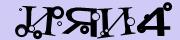
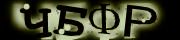
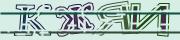
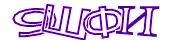
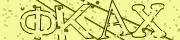
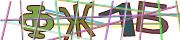
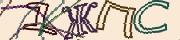
This page contains the details of Bulgarian Captcha (българска captcha, българска kапча) locales fully supported by BotDetect, for which there are both localized Captcha images and audio Captcha sounds available.
Supported Bulgarian CAPTCHA Locales
Bulgarian CAPTCHA
Captcha Locale overview:
| Language | Country | BotDetect Locale settings |
|---|---|---|
| Bulgarian | Bulgaria | bg, bg-BG |
Examples and specifications of individual Captcha feature localizations:
- Bulgarian localized Captcha images
- Bulgarian localized audio Captcha sounds
- Bulgarian localized Captcha codes
Bulgarian Localized CAPTCHA Images
Example Captcha images generated by BotDetect using the base Cyrillic character set for all Captcha ImageStyle values can be seen in the BotDetect Captcha image styles demo
To use BotDetect Captcha images localized for the Bulgarian Captcha Locale in your application, you can specify the Locale value:
- In ASP.NET applications, you can use either the
.aspxpage source:<!-- Captcha control localized to Bulgarian --> <BotDetect:WebFormsCaptcha ID="ExampleCaptcha" runat="server" Locale="bg" />
or the page code-behind:[C#] // Set the Captcha instance Locale to Bulgarian ExampleCaptcha.Locale = "bg";[VB.NET] ' Set the Captcha instance Locale to Bulgarian ExampleCaptcha.Locale = "bg"or Locale-dependent Captcha strings can be configured on application level in the
<botDetect>Web.config configuration section:<botDetect locale="bg"
- In Java applications, you can use either the application
web.xmlconfiguration file setting:<context-param> <param-name>BDC_locale</param-name> <param-value>bg</param-value> </context-param>
or the Captcha object instance-specific value:exampleCaptcha.setLocale("bg");
or Standard / Facelets JSF Captcha Tag page source:<botDetect:jsfCaptcha id="exampleCaptcha" locale="bg"
or JSP Captcha Tag page source:<botDetect:captcha id="exampleCaptcha" locale="bg"
- In ASP Classic applications, you can use either the application-global setting in the
BotDetect\CaptchaConfig.aspfile:' Set the default Locale for all Captcha instances in the ' Classic ASP application to Bulgarian BotDetect.Locale = "bg"
or the Captcha object instance-specific value:<% Dim ExampleCaptcha : Set ExampleCaptcha = (New Captcha)("ExampleCaptcha") ExampleCaptcha.UserInputID = "CaptchaCode" ' Set the Captcha object instance Locale to Bulgarian ExampleCaptcha.Locale = "bg" Response.Write ExampleCaptcha.Html %>
- In PHP applications, you can use either the application-global setting in the
lib/botdetect/CaptchaConfigDefaults.phpfile:// Set the default Locale for all Captcha instances in the // PHP application to Bulgarian $BDC_CaptchaConfig->Locale = 'bg';
or the Captcha object instance-specific value:<?php $ExampleCaptcha = new Captcha("ExampleCaptcha"); $ExampleCaptcha->UserInputID = "CaptchaCode"; // Set the Captcha object instance Locale to Bulgarian $ExampleCaptcha->Locale = 'bg'; echo $ExampleCaptcha->Html(); ?>
Bulgarian Localized Audio CAPTCHA Sounds
Example audio Captcha sounds generated by BotDetect using the Bulgarian Locale setting can be heard in the BotDetect Captcha features demo
To use BotDetect sounds localized for the Bulgarian Captcha Locale, you should also download the Bulgarian Pronunciation Sound Package and deploy the .bdsp file to the BotDetect sounds folder your application uses:
- ASP.NET applications use
Bin\BotDetectSoundsby default. A custom folder can be specified in the<botDetect>configuration section. - Java applications use
WEB-INF\BotDetectSoundsby default. A custom folder can be specified in theweb.xmlconfiguration file setting. - ASP Classic applications use
Redistribute\BotDetectSoundsin the BotDetect installation folder by default. A custom folder can be specified in theBotDetect/CaptchaConfig.aspfile. - PHP applications always use
lib/botdetect/Resources/Sounds.
Bulgarian Localized CAPTCHA Codes
The bg-BG Captcha locale uses a modified version of the Cyrillic character set, without Я.
Unicode Captcha Codes and Font Requirements
This table on the left uses the actual Unicode characters drawn in localized Captcha images.
Displaying these characters in your browser requires having fonts which support them installed on the client machine.
In ASP.NET and ASP Classic versions of BotDetect, generating localized Captcha images using these characters also requires supporting fonts on your server.
If viewing these characters in your browser or generating them in Captcha images on your server fails, you can enable the required localization support for on both client and server machines using Control Panel:
Windows 2000, XP, 2003 Server: Regional and Language Options → Languages → Supplemental language support.
Windows Vista, 7, 2008 Server: Region and Language → Keyboards and Languages → Install/uninstall languages.
CodeStyle.Alpha Bulgarian CAPTCHA Characters
| Unicode code point | Name | Character |
|---|---|---|
0x0410 |
a | А |
0x0411 |
be | Б |
0x0412 |
ve | В |
0x0413 |
ghe | Г |
0x0414 |
de | Д |
0x0415 |
ie | Е |
0x0416 |
zhe | Ж |
0x0417 |
ze | З |
0x0418 |
i | И |
0x041A |
ka | К |
0x041B |
el | Л |
0x041C |
em | М |
0x041D |
en | Н |
0x041E |
o | О |
0x041F |
pe | П |
0x0420 |
er | Р |
0x0421 |
es | С |
0x0422 |
te | Т |
0x0423 |
u | У |
0x0424 |
ef | Ф |
0x0425 |
ha | Х |
0x0426 |
tse | Ц |
0x0427 |
che | Ч |
0x0428 |
sha | Ш |
CodeStyle.Numeric Bulgarian CAPTCHA Characters
| Unicode code point | Name | Character |
|---|---|---|
0x0030 |
zero | 0 |
0x0031 |
one | 1 |
0x0032 |
two | 2 |
0x0033 |
three | 3 |
0x0034 |
four | 4 |
0x0035 |
five | 5 |
0x0036 |
six | 6 |
0x0037 |
seven | 7 (not used) |
0x0038 |
eight | 8 |
0x0039 |
nine | 9 |
CodeStyle.Alphanumeric Bulgarian CAPTCHA Characters
| Unicode code point | Name | Character |
|---|---|---|
0x0410 |
a | А |
0x0411 |
be | Б |
0x0412 |
ve | В |
0x0413 |
ghe | Г |
0x0414 |
de | Д |
0x0415 |
ie | Е |
0x0416 |
zhe | Ж |
0x0417 |
ze | З (not used) |
0x0418 |
i | И |
0x041A |
ka | К |
0x041B |
el | Л |
0x041C |
em | М |
0x041D |
en | Н |
0x041E |
o | О |
0x041F |
pe | П |
0x0420 |
er | Р |
0x0421 |
es | С |
0x0422 |
te | Т |
0x0423 |
u | У |
0x0424 |
ef | Ф |
0x0425 |
ha | Х |
0x0426 |
tse | Ц |
0x0427 |
che | Ч |
0x0428 |
sha | Ш |
0x0030 |
zero | 0 |
0x0031 |
one | 1 |
0x0032 |
two | 2 |
0x0033 |
three | 3 (not used) |
0x0034 |
four | 4 |
0x0035 |
five | 5 |
0x0036 |
six | 6 |
0x0037 |
seven | 7 (not used) |
0x0038 |
eight | 8 |
0x0039 |
nine | 9 |
Current BotDetect Versions
-
BotDetect ASP.NET CAPTCHA
2019-07-22v4.4.2 -
BotDetect Java CAPTCHA
2019-07-22v4.0.Beta3.7 -
BotDetect PHP CAPTCHA
2019-07-22v4.2.5